


Spending time in graveyards and libraries may not be everyone’s idea of summer fun, but for those interested in finding their roots, collecting information about one’s ancestors is a “family” vacation. Sure, genealogy sites have made researching one’s ancestral history much easier with digitized document archives, family-tree-building software and community forums. But not everything is online.
As you visit libraries, archives and cemeteries in pursuit of your roots, keep your smartphone or tablet at hand — it can help with translation tools, document scanners and more. Here are a few tips that can make your research trips more efficient.
Decipher text
Old newspapers, religious registries, grave markers and official government documents (either preserved in an analog archive or digitized online) can be invaluable resources for getting information about your ancestors. However, not every source may be in a language you know.
Google Lens (available as an Android app or within the Google app for iOS) can isolate the words in an image and offer an onscreen translation. You can also copy the isolated text into a note or document.
In iOS 15 and later, you can use Apple’s Live Text feature, which uses the camera to translate, copy and share text visible onscreen. When you have a document or headstone in view, tap the square Live Text icon in the bottom-left corner. The software highlights the words and offers a Translate option from the pop-up menu.
If you’re still at a loss for the words, consider the free translation apps on your phone. Google Translate (for Android and iOS and the desktop web browser) and Apple’s Translate app for its iOS devices are options, as are third-party translation apps and artificial intelligence chatbots.
If the software has trouble recognizing the text or you have handwritten records that produce garbled translations, try retyping the content into your phone’s notes app or a word-processing document. Next, paste that text into your translation app to see the results. Software-generated translations are not likely to be perfect, but you can probably get a general idea.
Poor-quality images, input errors or languages that use certain alphabets or stylized fonts can befuddle the software, so search the web for help with converting the words into something your translation app recognizes. For example, some newspapers produced for German immigrants used typefaces like Fraktur with certain characters that don’t exist in other alphabets, but you can find charts for identifying them.
Scan documents
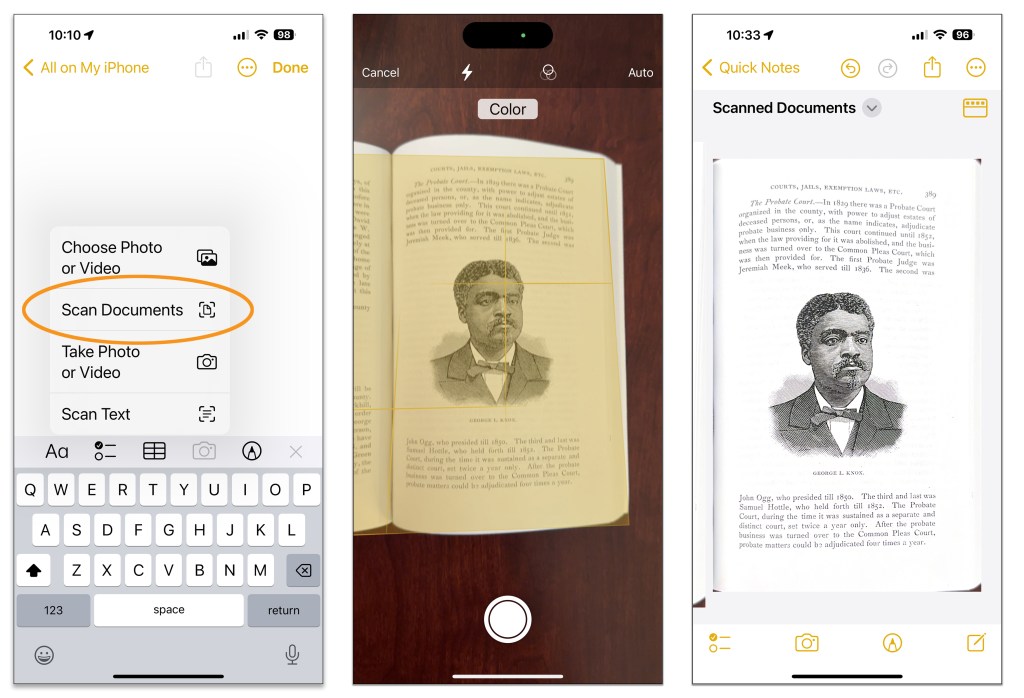
When you discover documents in libraries and archives that haven’t been digitized, use your phone to scan the pages you need (with the institution’s approval, of course). If you don’t have a dedicated scanner app, use the tool in the Google Drive or Apple’s Notes app.
In the Google Drive app for Android and iOS, tap the + button, choose Scan and point the phone’s camera and the document you want to capture. The file is saved to your Google Drive.
With Apple’s Notes app, create a new note and tap the camera icon. You have menu options to scan the document itself or scan the text from it right into your note.
Digitize Photos
Taking pictures of images in old yearbooks and other photo collections is a fast way to grab your own digital copies. Your phone’s photo-editing tools can quickly crop and enhance the files. You can also transfer and clean up the pictures later on your computer with photo-editing tools on a bigger screen.
Alternatively, Google has a free PhotoScan app for Android and iOS that attempts to correct glare, warping, perspective, crookedness and faded colors in old prints when you photograph them. When you open PhotoScan and point the phone at a picture you want to digitize, the app guides you through capturing the image from several angles. It then tries to reconstruct a better version by combining the separate shots and automatically enhancing the color, contrast and other elements of the image.
Find Graves
Visiting the final resting place of an ancestor allows you to both pay your respects and sometimes get new details from a burial marker. Online resources like Find a Grave and BillionGraves can point you to the plots (virtually or in person) and often provide photographs of headstones; BillionGraves has a free basic level and subscriptions that start at $5 a month for more features like the GPS coordinates of every burial site recorded.
Military veterans buried in national cemeteries are usually well documented. The Department of Veterans Affairs has a nationwide gravesite locator on its site, and Arlington National Cemetery has its own app with a search tool for finding the nearly 400,000 veterans laid to rest on its grounds. The American Battle Monuments Commission has a search page for those who died in the world wars and are buried overseas.
The free FamilySearch site has a collection of links for searching records for military cemeteries, as well as a lengthy guide to general cemetery research.
You may not tour the great sites in this sort of trip, but with a phone full of collected history, the journey could be just as memorable.
This article originally appeared in The New York Times.
Get more business news by signing up for our Economy Now newsletter.