


With summer officially over, it’s back to business (or school) for many people, which can mean more time writing longer things, especially on the go. The smartphone has replaced the laptop for many tasks, but when it comes to text input, tapping away on tiny onscreen keys might make you wish you had hauled along the computer just for its keyboard. Thankfully, your phone includes several features to make text entry much easier. Here are a few suggestions.
Visit your settings
Thanks to predictive text prompts, automatic punctuation and other shortcuts (like pressing vowel keys to see the pop-up menu of accent marks), typing on small glass rectangles isn’t as awkward as it used to be. To find out what features are available for your phone, start with its Settings app.
On an iPhone, tap General and then Keyboard.
For many Android phones, tap System, Keyboard, On-screen Keyboard and then Gboard (often the default app). Galaxy models typically offer the Samsung Keyboard with similar options.
You should see choices for spell-check, text correction — yes, Apple’s infamous Auto-Correction has gotten better — and other aids. For example, both the Apple iOS keyboard and the Google Gboard (which has an iOS version, too) can display a compact keyboard for easier single-handed input.
On the Gboard keyboard, press and hold the comma key for a shortcut into the settings — or tap the four-squares icon on the far left and select the One-Handed button; the same menu lets you resize or “float” the keyboard around the screen if you prefer.
Password-manager tools prevent mistyped logins, and fewer taps may help to prevent errors elsewhere. With tools like Slide to Type from Apple and Glide Typing by Google, you can drag your finger around the keyboard and the software guesses the word you want; note that the results may vary.
The keyboard can move the text-insertion cursor, too. On an iPhone, press and hold the space bar until the keyboard dims, and then drag your finger to reposition the cursor on the screen. For the Google Gboard, you can move the cursor by sliding a finger along the space bar if the “gesture cursor control” is enabled in the Glide Typing settings.
Apple and Google include keyboard layouts for typing in languages other than English or inserting emojis. You can add third-party keyboard apps, but beware of software from unfamiliar companies that could pose security risks.
Add hardware
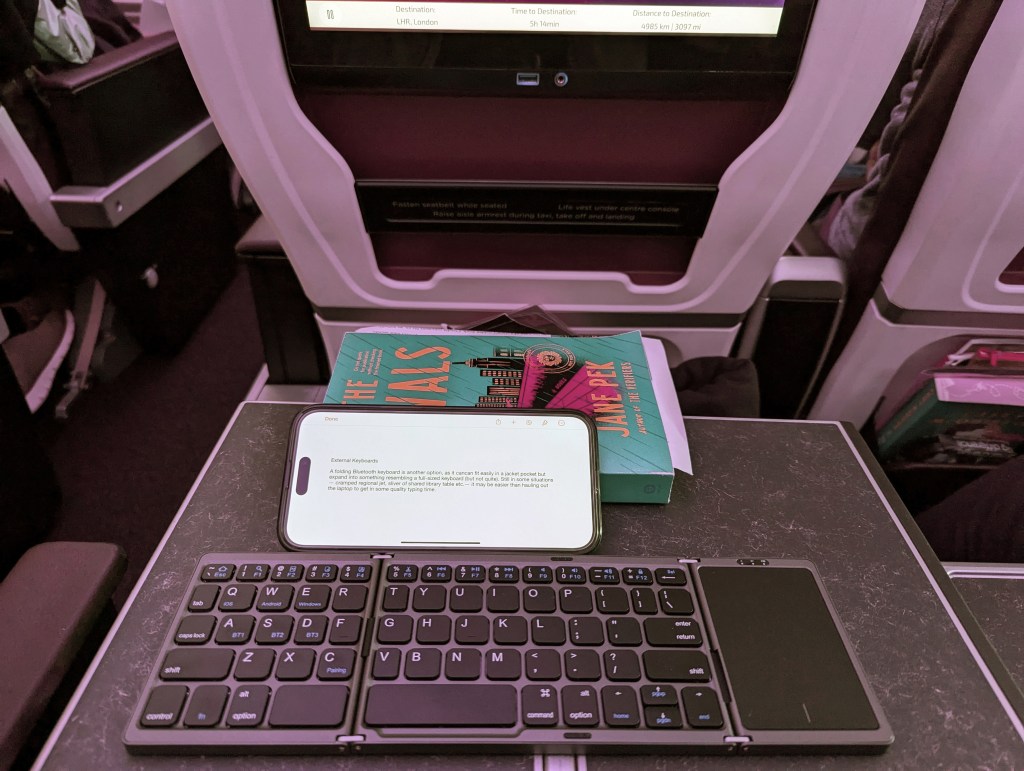
If you have a lot of text to enter, pairing your iPhone or Android phone with an external Bluetooth keyboard (including the Magic Keyboard made by Apple) lets you switch to traditional typing hardware. You can even use navigational buttons and shortcuts with an iPhone by going to Settings, Accessibility and Keyboards and enabling the Full Keyboard Access feature.
If you don’t want to haul a full keyboard around, consider a folding model, as it can fit easily in a jacket pocket but expand into something resembling a full-size set of keys.
Traveling keyboards, which typically fold up into two or three sections when not in use, range in price from about $25 to $80 depending on the size and features.
Speak your mind
Speech-to-text technology that converts the spoken word into editable type on the screen has been around for decades and has only become more accurate as the software has improved. Many apps (including virtual assistants) can take dictation. The Apple Notes app in iOS 18 can now directly record a live audio file and transcribe it.
To use the feature on an iPhone, open Settings, select General and then Keyboard, and turn on Enable Dictation. The Auto-Punctuation option automatically inserts commands, periods and question marks as you talk, but Apple’s site has a full list of dictation commands for editing text and inserting emoji characters.
On Android phones using the Gboard keyboard, open the Settings app, go to System, select Keyboard and make sure Google Voice Typing is enabled. When you tap the microphone icon, you can start speaking or select the Info icon (an encircled “i”) to see the list of voice commands that Gboard understands, including in the Google Docs word processor. As with most dictation apps, you must call out punctation by name, like “question mark” or “new paragraph,” and other formatting.
Dictation can be helpful for quickly transcribing a lot of words, but it may not be the best method for, say, a crowded coffee shop or composing a confidential memo within earshot of co-workers. Some dictation requests are uploaded to the internet for processing and require a network connection.
But no matter how you input your text, be sure to proofread it (or have artificial intelligence do it) before you send it along, as typographical errors do have a way of sneaking in no matter how you get your words on the screen.
This article originally appeared in The New York Times.
Get more business news by signing up for our Economy Now newsletter.